Church Translation App
Church Translation App or QR Browser Reader? What People Will Actually Use on Sunday
A church translation app can mean two very different things: software the church team uses to run translation, or an app every attendee must install. The first can be helpful; the second often creates friction for visitors. For most open-door services, a QR-code browser reader gives people the fastest route from arriving in the room to following the sermon in their own language.
The app question
Apps sound simple until guests have to download one.
For church teams, an app can sound tidy. For guests, it can add an app-store search, download, permissions, updates, account creation, and uncertainty about whether the unfamiliar software is safe. Those are small steps at home and significant barriers when the service has already started.
The best access method depends on the audience. A closed community that already uses one church app every day may accept a dedicated translation feature. A church welcoming tourists, international students, refugees, visiting family, and occasional attendees usually benefits from a link that works immediately.
Quick comparison
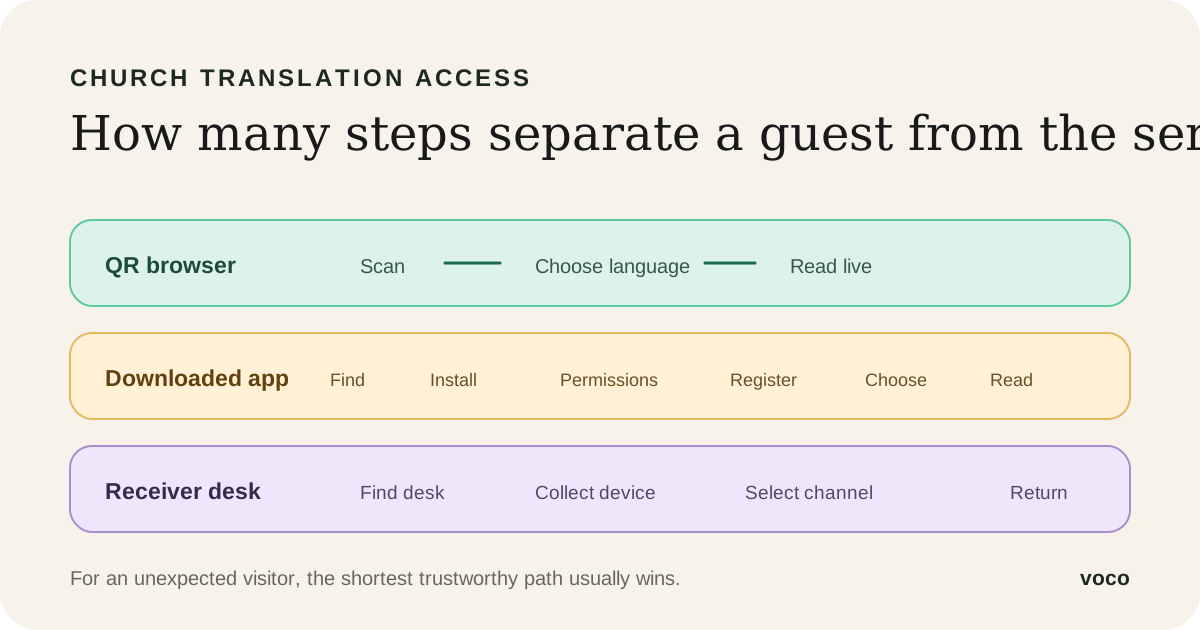
A browser reader removes the steps attendees are most likely to abandon.
With Voco, the operator still has a proper dashboard. The app-free decision applies to the congregation: attendees scan a permanent QR code, open the reader in Safari, Chrome, or another modern browser, choose a language, and read. They do not create an account, provide an email address, or remember a password.
Browser reader — scan, choose a language, and read without an installation.
Downloaded attendee app — find the correct listing, install it, accept permissions, and possibly register.
Receiver hardware — collect a device, learn the controls, and return it after the service.
Human interpreter — join the correct channel or seating area and follow spoken interpretation.
Guest adoption
The invitation matters as much as the technology.
Even a zero-install reader fails if nobody knows it exists. Put the QR code on a pre-service slide, near the entrance, and in any welcome information sent before a visit. Add a short link below it for people whose camera cannot scan from their seat.
Give the welcome team plain wording: 'Live translated text is available on your phone. Scan here and choose your language.' Avoid making assumptions about someone's nationality or preferred language. Offer the option to everyone and let people choose privately.
Language choice
One link should serve the languages present today and the visitor nobody expected.
The Voco reader offers 200+ attendee output languages. Each person selects independently from the same church link, so the team does not need to publish a separate QR code or issue a separate receiver for Spanish, Farsi, Korean, French, or another language.
Availability is not a promise of identical translation or device voice quality in every language. Test the languages your congregation relies on with fluent readers, and explain clearly whether a selected language offers live text, device speech, or both.
Accessibility
No-download access helps many people, but a smartphone cannot be the only route.
A browser reader lets attendees adjust text size and display preferences on their own device, which can be valuable for people who prefer readable captions. It also avoids unfamiliar shared equipment. But some people do not own a suitable phone, struggle with small screens, have limited data, or prefer not to use a phone during worship.
Keep a church-owned tablet, a shared caption display, printed instructions, or a human interpreter where needed. Translation, same-language captions, hearing support, and pastoral interpretation solve different barriers; a responsible church names those options separately.
Church setup
App-free for attendees does not mean careless for the operator.
The church still needs a clear speech source, a reliable connection, the correct source language, and a volunteer who can start and monitor the session. A direct sound-desk feed is the strongest regular setup, although a phone or laptop microphone is enough for an initial test.
Open the reader on a second phone before the service and keep it visible. That checks the real attendee experience rather than assuming the dashboard guarantees delivery. Rehearse the QR scan, language search, text controls, and recovery from a disconnected audio source.
When an app wins
A native app can make sense for a closed, highly engaged community.
If nearly every attendee already uses the same church app for messaging, giving, groups, and service content, translation inside that established experience may be convenient. Native apps can also support features such as downloaded media or push notifications that a live browser reader does not need.
That is a different job from helping an unexpected visitor understand a sermon within seconds. Do not require an installation merely because 'having an app' sounds more complete. Choose the smallest access journey that serves the people in front of you.
Buying test
Watch a first-time user join before comparing feature lists.
During Voco's 7-day trial, give the QR code to someone who has never seen the product. Do not coach them. Time how long it takes to open the reader, find a language, change the text size, and understand that translated segments will arrive live.
Then run ten minutes of real sermon audio and ask whether they could stay with the meaning. A smooth product demonstration operated by its founder is not the buying test. A normal visitor on ordinary church WiFi is.
Test iPhone and Android from a realistic seat.
Test the printed short link as well as the QR code.
Ask whether the invitation made the purpose obvious.
Keep one non-phone option available.
Related pages
FAQ
Do attendees need to download a church translation app?
Not with Voco. They scan the church's permanent QR code, choose a language, and read in their existing mobile browser. The church team uses a dashboard, but attendees do not install software or create accounts.
What is the downside of requiring an attendee app?
A download adds app-store search, installation time, permissions, updates, account questions, and another trust decision. That can work for an established community but creates avoidable friction for visitors and occasional attendees.
Is a browser reader compatible with iPhone and Android?
Voco is designed for modern mobile browsers on iPhone and Android. Test the actual devices and WiFi conditions common in your church, and keep a short URL or church-owned device available as a fallback.
Can several languages use the same QR code?
Yes. The same church reader offers 200+ output languages, and each attendee chooses independently. The church does not need a different QR code for every language.
Does browser translation work without internet access?
Live transcription, translation, and delivery require connectivity. If the venue cannot provide a dependable connection, test mobile data, improve the operator connection, or consider prepared translated material, a receiver system, or a human interpreter.
What should we offer people who cannot use a phone?
Keep an alternative such as a church-owned tablet, a shared caption screen, printed instructions with a short link, receiver hardware, or a human interpreter. A QR reader improves access for many people but should not become the only route.
Ready this Sunday
Choose the Sunday workflow people will actually use.
If the goal is fast multilingual access, a browser link usually beats an attendee app. Test that flow in a real service.